 Card Timeline
Follow the path.
See which lists a card moved through and review recorded moves in order. Understand how work reached its current stage.
Explore the timelineA clearer view of your Trello workflow
See where it’s been. Know how long it’s waited. Card Timeline+ puts movement history and time in list right where you work—in Trello.
Free during launch · No separate account · Built for Trello
CARD
Launch the new help center
The current list tells you where. The timeline tells you how.
Follow list moves
Check time in stage
Spot waiting work
Less guessing. More context.
Open Timeline on a card to put its current status in context. Use the same view for a support queue, a review process, or your next project.
See which lists a card moved through and review recorded moves in order. Understand how work reached its current stage.
Explore the timelineCheck how long a card has been in its current list. Card-level workflow analytics help you examine time across tracked stages.
Understand the detailsCard-front badges show time in stage or movement count. Set stage warnings to highlight cards that exceed your chosen time limit.
See how badges workTry the idea
This illustrative example follows a card from Intake to Review. Change the order to read the story from the beginning or start with the latest move.
Sample data only. This example never connects to your Trello account.
Install it on your own boardIn progress→Review
Backlog→In progress
Intake→Backlog
Showing the latest recorded move first.
Open the official Trello listing, add Card Timeline+, and complete Trello authorization when prompted.
Tracking starts after installation. Earlier moves aren’t imported.
Choose Power-Ups → Timeline to review its journey. Read the installation guide.
A quick look inside
A short, narrated guide to the timeline, workflow path, and card badges. Video in English. Select Play to load YouTube here.
Watch the walkthrough on YouTube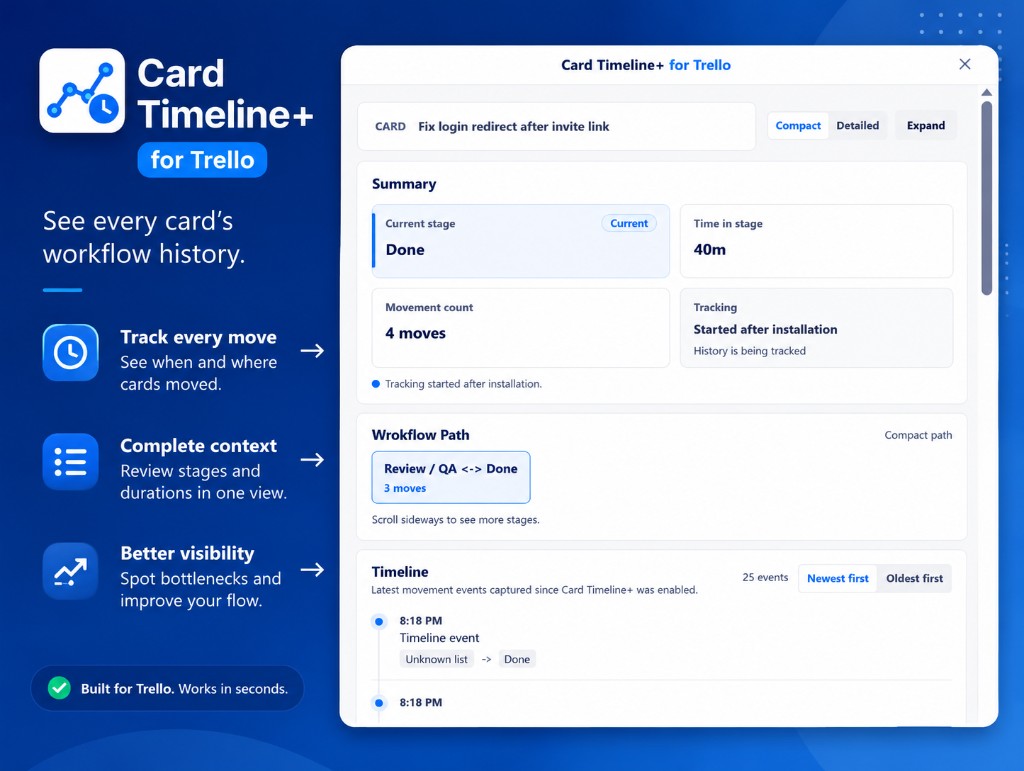
When Card Timeline+ is enabled on the board. It records list moves from that point; it doesn’t import earlier history or track comments and description changes.
Card Timeline+ is currently free during its launch period. No payment or subscription is required for the currently available features. Optional paid plans may be introduced with advance notice and clear pricing before payment is required.
No. Card Timeline+ focuses on individual cards: their movement history, time in list, workflow path, and card-level analytics.
No separate Card Timeline+ account is needed. You use it inside Trello and authorize the access it needs through Trello.
Learn by doing
Practical guides with product screenshots, clear steps, and a useful result on your own board.
Explore all tutorials →Open a card’s Timeline and follow the list moves that brought it to its current stage.
See a card’s movement history →Read time in stage and bring duration badges onto the board for a quicker review.
Track time in a Trello list →Combine badges, stage warnings and card history to review work that may need attention.
Find stalled cards in Trello →